
Bose QC Earbuds
Bose CorporationMusic & Audio
4.71.07K Reviews
- Version
- 3.0.3
- Installs
- 500.00K
- Age Rating
- Everyone
Screenshots
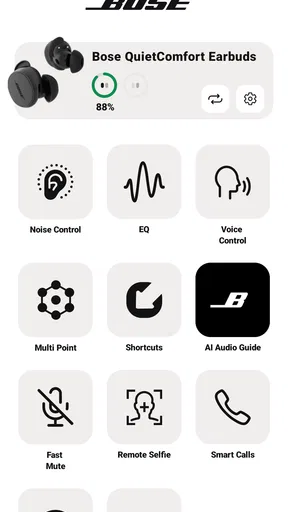
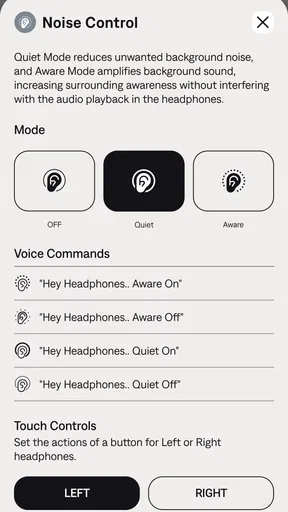
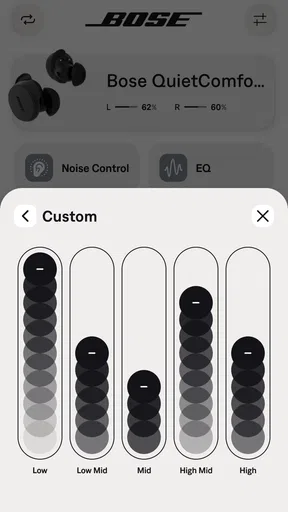
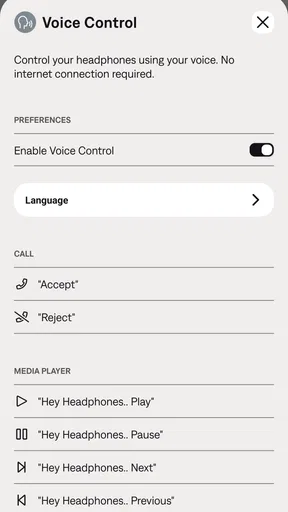
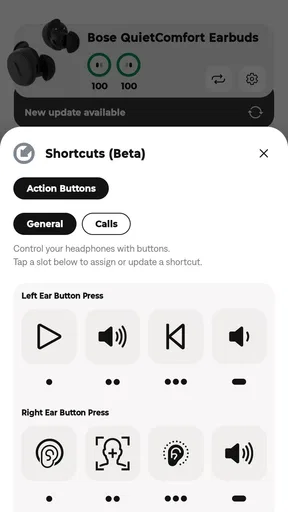
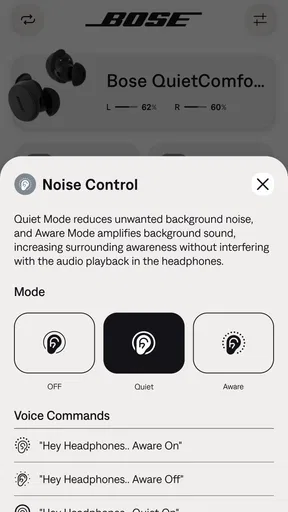

Our Review of Bose QC Earbuds
 Analysis by Appyee
I installed Bose QC Earbuds because managing wireless earbuds can become surprisingly awkward once you move beyond simply pressing play. Pairing, changing listening modes, checking battery information, and keeping the earbuds ready for the next call all become part of the daily routine. Bose Corporation’s companion app is designed to bring those tasks into one place, and after using it, I found that its real value is less about adding another music player and more about making the earbuds easier to live with.
This is a free Music & Audio app for Android and iOS, with an Everyone age rating. It is built specifically around Bose QuietComfort Earbuds rather than trying to control every brand of Bluetooth accessory. That narrow focus is important: if you own compatible Bose earbuds, the app can feel like the missing control panel; if you use another brand, it has no practical role in your setup.
The app has a 4.7 average from around 27 thousand ratings and has passed 500 thousand installs. Those figures suggest that many owners find the companion experience worthwhile, but they do not change the basic rule I would give a friend: choose it because you have Bose QuietComfort Earbuds, not because you are looking for a general-purpose audio app.
From opening the case to getting ready for the day
I start the day by treating Bose QC Earbuds as a quick preparation stop, not an app I need to keep open while I listen. This section looks at how that first connection and setup can shape the rest of a routine, especially when I want to avoid fiddling with controls after I have left home. From there, the next heading turns to what happens when listening becomes more demanding.
The starting condition matters more than the download
My first useful observation was that the app makes most sense when the earbuds are nearby, charged, and ready to connect. Installing it before handling the earbuds does not create much value by itself. The meaningful starting point is a real listening situation: the earbuds are in their case, the phone is available, and I want to turn them into a dependable part of my routine rather than leave their settings untouched.
The initial connection is also where expectations should stay realistic. Bose QC Earbuds is a control companion, not a replacement for the phone’s Bluetooth system and not a streaming service. Music still comes from the audio app I normally use. This app sits between the phone and the earbuds, helping me manage the hardware before I return to that music or call app.
I appreciate that separation because it keeps the purpose clear. I do not open it to browse albums or build playlists. I open it when I need to understand or change the behavior of my Bose earbuds. That makes the app more useful before a commute, a workout, a video call, or any moment when I do not want to troubleshoot audio after leaving home.
A practical setup flow
My preferred workflow is simple. I first place the earbuds close to the phone, open the app, and allow it to recognize the connected product. Once the earbuds appear, I check the main controls rather than immediately changing everything. This gives me a baseline: I can see whether the app is communicating properly and whether the earbuds are ready for use.
From there, I treat the app as a preparation screen. I review the available listening controls, make the adjustment that fits the situation, and then close the app before opening my usual music or podcast service. That handoff is important. The app is most effective when it takes a short role in the routine and then gets out of the way.
For a morning commute, I might connect at home, select the listening behavior I prefer for travel, and then put the phone away. For a quiet room, I can prepare the earbuds differently before starting a podcast. The useful insight is that settings are easier to think about before playback begins. Once a song is playing and I am walking outside, I am much less patient with menus, connection prompts, or repeated adjustments.
I also recommend checking the app after a major change in routine rather than constantly reopening it. If I move between commuting, office work, and home listening, a quick review before the transition is more efficient than trying to manage every detail while distracted. This is one of the app’s strongest everyday advantages: it turns small hardware decisions into a deliberate step.
What the app adds over ordinary Bluetooth controls
Phone Bluetooth settings are good at the basics: connecting, disconnecting, and sometimes showing a battery indicator. They are not designed as a full experience for a particular pair of earbuds. Bose QC Earbuds gives the product a dedicated home, so I do not have to search through a long list of generic device entries or remember which phone menu contains a particular control.
That dedicated approach also makes the earbuds feel less like a disposable Bluetooth accessory. The phone handles the connection, the music app handles playback, and the Bose companion handles the relationship between the phone and the earbuds. When those roles are clear, troubleshooting becomes easier because I know where to look first.
Compared with a typical all-brand Bluetooth utility, this is a better choice for Bose owners because it is not trying to offer a shallow collection of controls for dozens of products. Compared with doing everything manually, it offers a more coherent workflow. The trade-off is obvious: its usefulness ends when the Bose earbuds leave the picture.
Small decisions that improve the handoff
One non-obvious benefit is that the app encourages me to separate setup from listening. I can make changes while the earbuds are still in my hand, confirm that the app sees them, and only then start audio. That reduces the chance of discovering a problem halfway through a commute, when the phone is in a pocket and attention is elsewhere.
A second useful habit is to use the app as a diagnostic checkpoint rather than assuming a connection problem is a music-app problem. If audio does not behave as expected, I return to the Bose app first. If the earbuds are visible there, I know the accessory and phone are at least communicating, which narrows the next step. If they are not visible, restarting playback repeatedly is unlikely to solve the real issue.
A third insight is that the app works best as a “before and after” tool. Before listening, I use it to prepare the earbuds. After a long session, I use it to check their state and leave them ready for the next use. That is more practical than opening it every time I change a track, because the app is not meant to compete with the controls in my music service.
How the handoffs feel in real life
The most common handoff is from Bose QC Earbuds to a music or podcast app. In my routine, I want that transition to be nearly invisible: configure the earbuds, leave the companion, and play audio. When it works smoothly, the Bose app feels like a backstage tool rather than another destination I must manage.
Another handoff happens when I move from music to a call. The Bose app is not where I conduct the call, but it can be useful beforehand for making sure the earbuds are in the state I want. This is especially helpful when the call is scheduled and I have a minute to prepare, rather than when it arrives unexpectedly.
The final handoff is back to storage. After listening, I return the earbuds to their case and treat the app as optional unless I need to review something. This keeps the routine lightweight. A companion app becomes annoying when it demands attention for tasks that can happen automatically; here, I get the most from it when I use it intentionally.
The result after a normal day
In a realistic everyday scenario, I start at home with the earbuds in their case. I open the app, connect them, check the controls, and prepare them for a train ride. I then switch to my podcast app. At work, I use the earbuds again for a short listening session and later prepare them for a call. On the way home, I return to music without needing to rediscover the setup each time.
The result is not a dramatic transformation in sound by itself. The app’s achievement is organizational: it gives me a consistent place to manage the earbuds so I spend less time guessing which setting belongs to which device. For someone who uses Bose QuietComfort Earbuds throughout the day, that consistency can matter more than an extra visual flourish.
It also helps answer a practical question many buyers have: do I need to keep the app open while listening? In my workflow, no. I use it to configure and check the earbuds, then hand control back to the audio app. That makes it less demanding than an app that expects to remain active as the center of every listening session.
Where the workflow breaks
The narrow product focus is the first limitation. If you switch between brands, Bose QC Earbuds will not become a universal dashboard for all your headphones. I would skip it as a general audio manager and use the companion app for each brand only when I actually own that brand’s hardware.
There is also a learning curve caused by the division of responsibilities. New users may open this app expecting to find their music, then discover that playback still belongs elsewhere. That is not a flaw in the app’s purpose, but it can feel like an extra step until the workflow becomes familiar. I would explain it this way: the Bose app manages the earbuds; your preferred audio app manages what you hear.
Another point of friction appears when the phone and earbuds do not connect cleanly. A dedicated app makes the intended path clearer, but it cannot remove every Bluetooth-related interruption. If the earbuds are not available to the phone, I may still need to work through the phone’s connection process before the companion can help. The app improves visibility; it does not make wireless connections immune to real-world problems.
I would also avoid changing settings casually without remembering why I changed them. A mode that feels right during a commute may not be ideal in a quiet room, and repeated adjustments can make the earbuds feel inconsistent. My solution is to make one change at a time and test it in the place where I actually plan to listen. That turns the app into a controlled tool instead of a menu to explore endlessly.
Who should install it
I recommend Bose QC Earbuds to owners who want a dedicated way to manage their QuietComfort Earbuds and who regularly move between different listening situations. It is particularly useful for people who want a repeatable setup before commuting, working, exercising, or joining calls. The free price removes the main barrier to trying it, and its Everyone rating makes it suitable for a broad household audience.
I would be more cautious if you rarely change anything about your earbuds. If you only connect them occasionally and are satisfied with the phone’s basic Bluetooth controls, the companion app may not become part of your daily routine. It still makes sense to have when you need product-specific management, but its value is highest for regular users rather than someone who treats the earbuds as a once-a-week accessory.
It is also not the right choice for someone shopping for a standalone music player, a podcast catalog, or a cross-brand headphone controller. Those needs belong to other types of apps. Bose’s approach is more focused, and that focus is both its strength and its boundary.
Version, support expectations, and my verdict
The app is currently at version 3.0.3 and supports Android 10 or later. That makes the operating-system requirement worth checking before installation, especially if you are using an older phone. I would also keep the app updated when possible because companion software depends on reliable communication with the earbuds and the phone’s Bluetooth environment.
Its release date was September 15, 2024, so I view it as a relatively current part of Bose’s software experience rather than an abandoned setup utility. Still, the best test is practical: install it, connect the earbuds, and see whether its dedicated controls fit your routine. A high average rating and around 1.1 thousand written reviews show strong user interest, but personal fit matters more than popularity here.
My final opinion is positive, with a clear condition. Bose QC Earbuds is most valuable as a preparation and handoff tool, not as another place to consume audio. It helps me move from earbuds in a case to a predictable listening session, gives me a product-specific checkpoint when something feels wrong, and keeps Bose controls separate from the apps that actually play music.
If you own compatible Bose QuietComfort Earbuds, I would install it and build a simple routine around it: connect before leaving, make only the adjustment you need, hand off to your normal audio app, and return to the companion when troubleshooting or preparing for a different situation. If you do not own those earbuds, choose a broader audio utility or the companion app for your actual hardware instead. For the right owner, this free app makes the everyday path from connection to listening noticeably more orderly.
Verdict
Strengths of Bose QC Earbuds
- Excellent active noise cancellation for travel and busy environments.
- Secure, comfortable fit with multiple ear-tip and stability-band options.
- Rich, detailed sound with adjustable EQ in the Bose Music app.
- Strong call quality with effective voice pickup in most conditions.
- Reliable multipoint connectivity makes switching between devices convenient.
Limitations of Bose QC Earbuds
- The earbuds are bulkier than many newer premium competitors.
- Battery life is average compared with several similarly priced models.
- Some advanced features require the Bose Music companion app.
- Touch controls can occasionally misread taps or gestures.
- The premium price may be difficult to justify for casual listeners.
Other Releases by Bose Corporation
View All
Bose Connect
Music & Audio4.2

Bose
Music & Audio3.4
Similar Picks in This Category
View All
YouTube Music
Google LLC4.4

Samsung Music
Samsung Electronics Co., Ltd.3.8

Spotify: Music and Podcasts
Spotify AB4.3

JioSaavn - Music & Podcasts
Saavn Media Limited4.3

Lark Player:Music Player & MP3
Lark Player Studio - Music, MP3 & Video Player4.6

StarMaker: Sing Karaoke Songs
SKYWORK AI PTE. LTD.4.3
Frequently Asked Questions
What are Bose QC Earbuds, and who are they best suited for?
Bose QC Earbuds are true wireless headphones designed for everyday listening, calls, travel, workouts, and focused work. Their main attraction is Bose’s active noise cancellation, which helps reduce surrounding sounds such as traffic, office chatter, and airplane noise. They are especially suitable for listeners who prioritize comfort, strong noise isolation, and a balanced sound experience over advanced audiophile controls or extensive smart features.
Do Bose QC Earbuds require a companion app?
The earbuds can be connected and used through your phone’s Bluetooth settings, so the Bose app is not strictly required for basic playback. However, installing the Bose Music app is recommended because it can guide setup, provide firmware updates, let you adjust noise-cancellation modes, manage connected devices, and access available sound settings. The exact features may vary depending on the specific QC Earbuds generation and your phone’s operating system.
How effective is the noise cancellation on Bose QC Earbuds?
Noise cancellation is one of the strongest reasons to consider Bose QC Earbuds. During testing, the earbuds are particularly useful for reducing steady low-frequency sounds, including engines, air conditioners, and public transportation. They also offer an aware or transparency-style mode for hearing conversations and surroundings without removing the earbuds. Performance depends on the ear-tip seal, fit, environment, and the exact model you purchase.
Are Bose QC Earbuds comfortable and suitable for exercise?
Comfort depends on choosing the correct ear-tip and stability-band size, but the included fitting options generally help the earbuds remain secure during walking, commuting, and moderate workouts. Many models are designed with sweat or water resistance, although they should not be submerged unless Bose specifically states that the model supports it. Users should also clean and dry the earbuds regularly, especially after exercise, to protect the charging contacts and maintain hygiene.
What should I know about battery life, calls, and compatibility before downloading the app?
Battery life varies by model, listening volume, noise-cancellation settings, and use of features such as multipoint connections. The charging case provides additional charges, while USB-C or wireless charging support depends on the specific version. Bose QC Earbuds generally work with modern Android and iOS phones through Bluetooth, and the app supports setup and customization. Call quality is suitable for everyday conversations, but wind and crowded environments can affect microphone performance.
